
[fancy_header3 variation=”deepblue”]Open vSwitch Red Hat Installation[/fancy_header3]
This is an updated tutorial for an Open vSwitch Red Hat Installation. It is a little tricky at the moment from a kernel-devel bug that has a broken symbolic link. I did a screencast also in case anyone gets stuck. Just let me know if I mistyped anything and I will update it.
[fancy_header3 variation=”deepblue”]Install Open vSwitch Pre-Reqs for Red Hat[/fancy_header3]
The OS details are here.
|
1 2 3 4 5 6 |
[root@localhost]# uname -a Linux localhost.localdomain 2.6.32-279.el6.x86_64 #1 SMP Fri Jun 22 12:19:21 UTC 2012 x86_64 x86_64 x86_64 GNU/Linux [root@localhost]# cat /etc/redhat-release CentOS release 6.3 (Final) |
Next using Yum, install some dependencies.
|
1 2 3 4 5 6 |
yum install gcc make python-devel openssl-devel kernel-devel kernel-debug-devel wget http://openvswitch.org/releases/openvswitch-1.7.1.tar.gz tar xvfz openvswitch-1.7.1.tar.gz cd openvswitch-1.7.1 |
[fancy_header3 variation=”deepblue”]Open vSwitch Red Hat Installation[/fancy_header3]
No need to run -> ./boot.sh from the tarball.
Next fix a bug from kernel-devel before you run ./configure.
|
1 2 3 |
cd /lib/modules/2.6.32-279.el6.x86_64/ |
rm build Add the new symlink based on the output of:
|
1 2 3 4 5 |
ls /usr/src/kernels/ rm build ln -s /usr/src/kernels/2.6.32-279.14.1.el6.x86_64/ build |
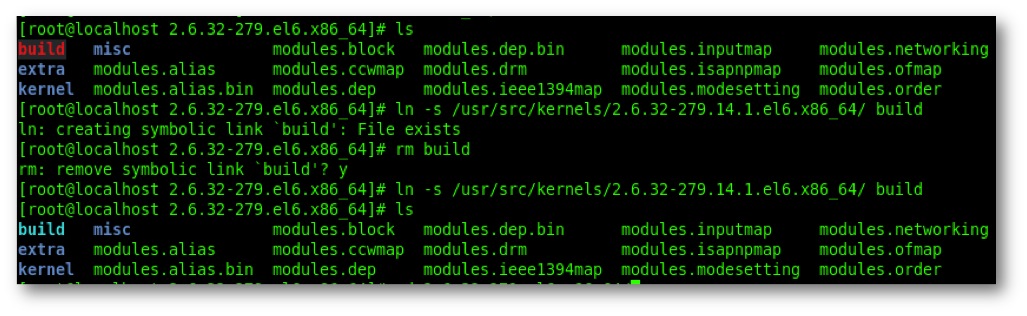
Figure 1. It will look something like this. Notice the symbolic link is linked to a bad target. you will simply re-link that.
Once you fix the symlink your configure will run clean so cd back into the openvswitch dir.
|
1 2 3 |
cd ~/openvswitch-1.7.1 |
Now ./configure will go clean.
|
1 2 3 |
./configure --with-linux=/lib/modules/`uname -r`/build |
If you leave the bad symlink you will get this error:
|
1 2 3 |
configure: error: source dir /lib/modules/2.6.32-279.el6.x86_64/build doesn't exist |
Next we need to edit a kernel file and comment something out.
|
1 2 3 |
vi openvswitch-1.7.1/datapath/linux/compat/include/linux/skbuff.h |
Open skbuff.h and head to line 242 or there about. Find the following code and comment it out.

Figure 2. Edit skbuff.h around line 242.
Change it to reflect the next screenshot by commenting out the following method and next three lines after it.
|
1 2 3 |
static inline struct page *skb_frag_page(const skb_frag_t *frag) |
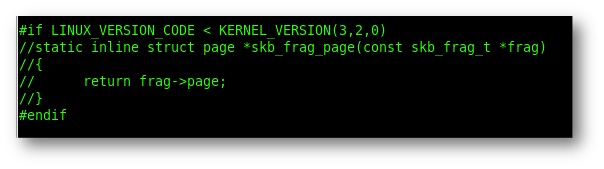
Figure 3. Here is what it should look like after the edit.
Now finish the build.
|
1 2 3 |
make && make install |
If you do not comment out the file properly you will get and error like the following:
|
1 2 3 4 5 6 7 8 9 10 11 12 13 14 15 16 17 18 19 20 21 |
make -C /lib/modules/2.6.32-279.el6.x86_64/build M=/home/brent/openvswitch-1.7.1/datapath/linux modules make[4]: Entering directory `/usr/src/kernels/2.6.32-279.14.1.el6.x86_64' CC [M] /home/brent/openvswitch-1.7.1/datapath/linux/genetlink-brcompat.o In file included from /home/brent/openvswitch-1.7.1/datapath/linux/compat/include/linux/netlink.h:4, from /home/brent/openvswitch-1.7.1/datapath/linux/compat/include/net/genetlink.h:5, from /home/brent/openvswitch-1.7.1/datapath/linux/compat/genetlink.inc:3, from /home/brent/openvswitch-1.7.1/datapath/linux/genetlink-brcompat.c:10: /home/brent/openvswitch-1.7.1/datapath/linux/compat/include/linux/skbuff.h:242: error: redefinition of ‘skb_frag_page’ include/linux/skbuff.h:1612: note: previous definition of ‘skb_frag_page’ was here make[5]: *** [/home/brent/openvswitch-1.7.1/datapath/linux/genetlink-brcompat.o] Error 1 make[4]: *** [_module_/home/brent/openvswitch-1.7.1/datapath/linux] Error 2 make[4]: Leaving directory `/usr/src/kernels/2.6.32-279.14.1.el6.x86_64' make[3]: *** [default] Error 2 make[3]: Leaving directory `/home/brent/openvswitch-1.7.1/datapath/linux' make[2]: *** [all-recursive] Error 1 make[2]: Leaving directory `/home/brent/openvswitch-1.7.1/datapath' make[1]: *** [all-recursive] Error 1 make[1]: Leaving directory `/home/brent/openvswitch-1.7.1' make: *** [all] Error 2 |
Now that you got it to build cleanly you need to make sure the linux bridge kernel module is not loaded.
|
1 2 3 4 5 |
lsmod | grep bridge bridge 79950 0 /sbin/rmmod bridge |
Then insert the openvswitch.ko kernel module. Fastpath good, slow path bad. This is executed from within the untarred Open vSwitch directory where you compiled the code so the full path would be /home//openvswitch/datapath/linux/openvswitch.ko.
|
1 2 3 |
insmod datapath/linux/openvswitch.ko |
If you do not remove the Linux bridge module you will get ths follwoing error.
|
1 2 3 4 5 6 |
$ insmod datapath/linux/openvswitch.ko insmod: error inserting 'datapath/linux/openvswitch.ko': -1 Invalid module format $ dmesg | tail openvswitch: exports duplicate symbol br_should_route_hook (owned by bridge) |
The rest is just copy and paste.
|
1 2 3 4 5 6 7 8 9 10 11 12 13 14 15 |
insmod datapath/linux/openvswitch.ko touch /usr/local/etc/ovs-vswitchd.conf mkdir -p /usr/local/etc/openvswitch ovsdb-tool create /usr/local/etc/openvswitch/conf.db vswitchd/vswitch.ovsschema ovsdb-server /usr/local/etc/openvswitch/conf.db \ --remote=punix:/usr/local/var/run/openvswitch/db.sock \ --remote=db:Open_vSwitch,manager_options \ --private-key=db:SSL,private_key \ --certificate=db:SSL,certificate \ --bootstrap-ca-cert=db:SSL,ca_cert --pidfile --detach --log-file ovs-vsctl --no-wait init ovs-vswitchd --pidfile --detach ovs-vsctl show |
Configure the Open vSwitch Bridge and Network
|
1 2 3 4 5 6 7 |
ovs-vsctl add-br br0 sudo ifconfig eth0 0 sudo ovs-vsctl add-port br0 eth0 sudo ifconfig br0 192.168.1.20 netmask 255.255.255.0 route add default gw 192.168.1.1 br0 |
[fancy_header3 variation=”deepblue”]Open vSwitch Red Hat Installation Screencast[/fancy_header3]
[youtube url=”http://www.youtube.com/watch?v=x_3HFfdHTQA&hd=1″ width=”640″ height=”360″ hd=”1″]
Thanks for stopping by, feel free to post any issues, apologies for any delays in response.

I exactly followed the instruction to compile openvswitch-1.4.5 on CentOS 6.3. Compilation was a success. However, when I did ‘insmod openvswitch_mod’, the following error message was found in dmesg:
openvswitch_mod: Undefined symbol ‘kmem_cache_alloc_trace’
Laster I found out that it was caused by a mismatch between the running kernel, which was installed from original ISO, and the kernel headers, which was installed by yum install kernel-devel.
I did a yum distribution-synchronization. Then reboot the system with the up-to-date kernel and redo the compilation. Finally, the kernel module can be insmod without any error.
Hey! Quick question that’s entirely off topic. Do you know how to make your site mobile friendly? My web site looks weird when browsing from my iphone. I’m trying to find a theme or plugin that might be able to
fix this problem. If you have any suggestions, please share.
Appreciate it!
What a stuff of un-ambiguity and preserveness of precious knowledge concerning unpredicted emotions.
Hey there just wanted to give you a quick heads up. The text in your article
seem to be running off the screen in Firefox. I’m not sure if this is a formatting issue or something to do with internet browser compatibility but I figured I’d post to let you know.
The layout look great though! Hope you get the problem fixed soon.
Many thanks
Great Blog. I’ve found lots of useful information. I really appreciate it.
I just ran these instructions on a CentOS 6.4 system and the kernel-devel bug is not there (I dod not have to fix the symlink).
Thanks again!
CentOS 6.4 kernel already includes the openvswitch kernel module. So just compile the userspace program without –with-linux option.
Thanks Jian!
I enjoy what you guys are usually up too. This type of clever work and exposure!
Keep up the wonderful works guys I’ve added you guys to blogroll.
Hi,
I am getting this error after make:
make[4]: Entering directory `/usr/src/kernels/2.6.18-371.6.1.el5-i686′
CC [M] /root/openvswitch-1.1.0pre2/datapath/linux-2.6/addrconf_core-openvswitch.o
/root/openvswitch-1.1.0pre2/datapath/linux-2.6/addrconf_core-openvswitch.c:
In function ‘__ipv6_addr_type’:
/root/openvswitch-1.1.0pre2/datapath/linux-2.6/addrconf_core-openvswitch.c:78:
error: ‘IPV6_ADDR_RESERVED’ undeclared (first use in this function)
/root/openvswitch-1.1.0pre2/datapath/linux-2.6/addrconf_core-openvswitch.c:78:
error: (Each undeclared identifier is reported only once
/root/openvswitch-1.1.0pre2/datapath/linux-2.6/addrconf_core-openvswitch.c:78:
error: for each function it appears in.)
make[5]: *** [/root/openvswitch-1.1.0pre2/datapath/linux-2.6/addrconf_core-openvswitch.o]
Error 1
make[4]: *** [_module_/root/openvswitch-1.1.0pre2/datapath/linux-2.6] Error 2
make[4]: Leaving directory `/usr/src/kernels/2.6.18-371.6.1.el5-i686′
make[3]: *** [default] Error 2
make[3]: Leaving directory `/root/openvswitch-1.1.0pre2/datapath/linux-2.6′
make[2]: *** [all-recursive] Error 1
make[2]: Leaving directory `/root/openvswitch-1.1.0pre2/datapath’
make[1]: *** [all-recursive] Error 1
make[1]: Leaving directory `/root/openvswitch-1.1.0pre2′
make: *** [all] Error 2
I guess that some dependency is missing, but I can’t figure out which one…
Please help
What’s Going down i’m new to this, I stumbled upon this I have discovered It positively helpful
and it has aided me out loads. I’m hoping to give a
contribution & aid other customers like its helped me. Good job.
I think everything posted was actually very logical. But,
what about this? what if you were to create a killer headline?
I ain’t suggesting your content is not good., however suppose you added a headline that makes people desire more?
I mean Open vSwitch Red Hat Installation is kinda vanilla.
You could glance at Yahoo’s front page and note how they create news headlines to grab viewers to click.
You might try adding a video or a related picture or two
to grab people interested about what you’ve
got to say. Just my opinion, it might bring your posts a little
bit more interesting.