
[fancy_header3 variation=”orange”]Open vSwitch GRE Tunnel Configuration[/fancy_header3]
[colored_box title=”Open vSwitch Updated Tutorial” variation=”silver”]-I updated this September 20, 2012. Also adding this PDF from a instruction I did over the summer at an Internet2 conference. Download the lab here OpenFlow and Open vSwitch GRE Tunnel Configuration Tutorial.
-Another lab building from source with video and pretty vetted is Configuring VXLan and GRE Tunnels on OpenvSwitch[/colored_box]
[fancy_header3 variation=”orange”]Open vSwitch GRE Tunnel Screencast[/fancy_header3]
[youtube url=”http://www.youtube.com/watch?v=VMP4Q2XtFjw” width=”635″ height=”360″ hd=”1″]
We continue to destroy our nice clean data centers to facilitate poor application architectures that do not scale in a layer 3 fashion. We continue to come up with new technologies using old architectures to turn our networks into flat data centers under the guise of “cloud mobility”. Ok sorry, I got that out of my system.
[fancy_header3 variation=”orange”]Open vSwitch and Data Center Overlays[/fancy_header3]
Open vSwitch is a virtual switch or virtual Ethernet bridge (VEB) becoming quite popular and being backed by many vendors as the alternative to the virtual switches in some of the productized hypervisors like Hyper-V, VMware etc. Overlays are not new concepts, but are being used in new use cases. It is an early mechanism to uncouple the virtual from the physical. What remains to be seen, is whether this is a bridge until hardware becomes generalized or the new standard.
The OVS developers is still ironing out the control portion of OVS, with that will come the scale of L3 addressing and multipathing to each Tunnel End Point (TEP). The current code supports the GRE key lookup and forwarding while NVGRE and VXlan have at least taken a stab at the control plane, unfortunately through multicast for broadcast flooding L Next-gen ASICs will and Ethernet controllers will open the door to more plates of spaghetti.

Figure 1. Generic look at where the headers are being modified.
I am still on the fence on where a TEP should reside, on a physical top of rack end of row network device or reside in the hypervisor. The networking guy in me would prefer that to be an S-tag in a pseudowire, but I can’t help but lean towards anything in software, moving forward to provide programmatic scale. We are on the path of the programmatic abstraction to being migrated into our network operating systems, but that is a big ship that will presumably take a while to steer.
Enough gibber on to an L2GRE configuration on an Open vSwitch. I did this because I was surprised to not see a GRE cookbook on the Open vSwitch cookbook page. http://openvswitch.org/support/config-cookbooks/
BTW why the kitchen cooking trend these days? What happened to the good old how-to? Not cloudy enough, that needed abstraction also. Do we change RTFM to RTFC? I blame the Opscode Chef Openstack installer.
[fancy_header3 variation=”orange”]Open vSwitch Installation Tutorials[/fancy_header3]
- First install Open vSwitch on a couple of nodes. The following links will help you get started:
- Install from packages http://networkstatic.net/2012/05/openvswitch-configure-from-packages-and-attaching-to-a-floodlight-openflow-controller/
- Compile from source http://networkstatic.wordpress.com/2012/04/16/installing-and-configuring-openvswitch-on-ubuntu-12-04-precise-pangolin/
- I am using KVM for the example to spin up a tap interface for the VM to use for the TEPs. Here is a how-to for that. http://networkstatic.wordpress.com/2012/02/03/installing-openvswitch-on-ubuntu-11-10-with-kvm/
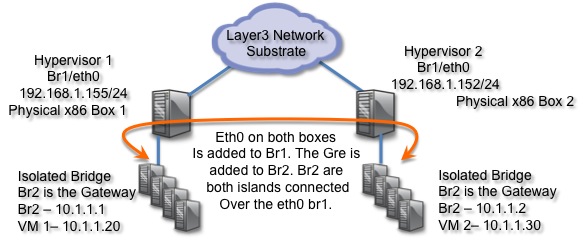
Figure 2. Here is the topology of the configuration.
Open vSwitch 1 configuration
|
1 2 3 4 5 6 7 8 9 |
sudo ifconfig eth1 0 sudo ovs-vsctl add-br br1 sudo ovs-vsctl add-br br2 sudo ovs-vsctl add-port br1 eth0 sudo ifconfig br1 192.168.1.155 netmask 255.255.255.0 sudo ifconfig br2 10.1.1.1 netmask 255.255.255.0 sudo ovs-vsctl add-port br2 gre0 -- set interface gre0 type=gre options:remote_ip=192.168.1.152 |
Open vSwitch 2 configuration
Hypervisor 2 Configuration:
|
1 2 3 4 5 6 7 8 9 |
sudo ifconfig eth1 0 sudo ovs-vsctl add-br br1 sudo ovs-vsctl add-br br2 sudo ovs-vsctl add-port br1 eth0 sudo ifconfig br1 192.168.1.152 netmask 255.255.255.0 sudo ifconfig br2 10.1.1.2 netmask 255.255.255.0 sudo ovs-vsctl add-port br2 gre0 -- set interface gre0 type=gre options:remote_ip=192.168.1.155 |
- Add KVM tap VIF script
/etc/ovs-ifup and /etc/ovs-ifdown
#Paste in the following with br1 = equalling the bridge you made in ovs-vsctl. Since we want the VM on the bridge that will get tunneled we are not using br0.
Create this script for provisioning.
|
1 2 3 4 5 6 7 8 9 10 |
; html-script: false ]nano /etc/ovs-ifup #+++++++++++++++++++++++++++++++ #!/bin/sh switch='br2' /sbin/ifconfig $1 0.0.0.0 up ovs-vsctl add-port ${switch} $1 #+++++++++++++++++++++++++++++++ chmod +x /etc/ovs-ifup |
Then one for ifdown to de-provision.
|
1 2 3 4 5 6 7 8 9 10 |
; html-script: false ]nano /etc/ovs-ifdown #+++++++++++++++++++++++++++++++ #!/bin/sh switch=’br2’ /sbin/ifconfig $1 0.0.0.0 down ovs-vsctl del-port ${switch} $1 #+++++++++++++++++++++++++++++++ chmod +x /etc/ovs-ifdown |
- Now spin up your VM. I use the following to boot Ubuntu off CD. The VM instance will tap br1 (bridge1) on the 10.1.1.0/24 network.
|
1 2 3 4 5 |
; html-script: false ]kvm -m 512 -net nic,macaddr=12:34:52:CC:CC:10 \ -net tap,script=/etc/ovs-ifup,downscript=/etc/ovs-ifdown \ -cdrom /home/brent/images/ubuntu-11.10-desktop-i386.iso & |
[fancy_header3 variation=”orange”]Attach OpenvSwitch to a Floodlight openFlow Controller[/fancy_header3]
Hypervisor 1
|
1 2 3 4 5 6 7 8 9 10 |
#Install the Floodlight Openflow Controller git clone git://github.com/floodlight/floodlight.git cd floodlight ant java -jar target/floodlight.jar #Add OVS bridges sudo ovs-vsctl set-controller br1 tcp:192.168.1.155:6633 sudo ovs-vsctl set-controller br2 tcp:192.168.1.155:6633 |
Hypervisor 2
|
1 2 3 4 5 6 7 8 9 10 |
#Install the Floodlight Openflow Controller git clone git://github.com/floodlight/floodlight.git cd floodlight ant java -jar target/floodlight.jar #Add OVS bridges sudo ovs-vsctl set-controller br1 tcp:192.168.1.155:6633 sudo ovs-vsctl set-controller br2 tcp:192.168.1.155:6633 |
Some commands to view the configuration and ports:
- More on how to get KVM integrated here: http://networkstatic.wordpress.com/2012/02/03/installing-openvswitch-on-ubuntu-11-10-with-kvm/
- We now should be able to ping from VM1 -> VM2 and see the mac address table flood and learn one another’s ARP entries.

Figure 2. Now we have flattened out these two endpoints whether in the same data center or across the city/state that can be used for a live workload migration (e.g. vMotion).

Figure 3. There is some scale to where this can go, for either provisioning elastic compute nodes or migrating, live migrations or just fixing broken applications.
Hi, Brent. Which version of Open vSiwtch did you use? Once i add a gre tunnel between two hosts, one of the host will crash and i have to reboot the machine. Do you have any idea what is going on with my ovs? The ovs i am using are 1.5.0 on a Debian Squeeze host and 1.4.0 on a Ubuntu 12.04 host. Both hosts have only one nic.
Hi Lanbo,
The version was ovs_version: “1.4.0+build0” from the repos.
Weird it all crashed. Can you paste some output and I can maybe help with it.
When I get a second to breath this week I was planning on revisiting a couple of tunneling aspects in OVS. I will update a new post on that if that helps.
Thanks,
-Brent
So Sorry, lanbo, missed your message. I am betting it is a loop there. Maybe make sure you are adding a physical nic to the right bridge and not both or else a bridging loop spins up. Just answering in case anyone else has the problem. Sorry again for missing it.
I just try to follow the steps you posted under ubuntu12.04 and ovs ovs_version: “1.4.0+build0”
but it gets error.
root@c10:~# ovs-vsctl add-port br0 gre0 –set interface gre0 type=gre options:remote_ip=10.50.8.9
ovs-vsctl: Port does not contain a column whose name matches “–set”
also if it is a must to add gre module to the linux kernel,and my kernel is
root@c10:~# uname -r
3.2.0-26-generic
root@c10:~# lsmod | grep gre
root@c10:~#
Thank you in advance, you timely reply is welcomed.
Hi, Try using the install from packages here. http://networkstatic.net/2012/06/openflow-openvswitch-lab/
Once you install this should work.
Build GRE Tunnel
On host ovs1 add:
ovs-vsctl add-port br1 gre1 — set interface gre1 type=gre options:remote_ip=172.31.246.23
On host ovs2 add:
ovs-vsctl add-port br1 gre1 — set interface gre1 type=gre options:remote_ip=172.31.246.21
Just vetted it last night. Let me know if it doesnt work from packages.
Thanks!
-Brent
Hi,
If I have 3 datacenters, the VMs on the datacenters are able to communicate with eachother via GRE tunnel, what should I do?
Is there any way to configure multiple remote_ip for a host?
Thanks a lot.
Hi Bob, Absolutely. A GRE can be built over a routed network. You could build a tunnel between data centers even if they were only connected by the Internet. Take a look at Capwap also. It is essesntially mac-in-gre.
Thanks for your reply, is there any existing tools to setup GRE tunnel over a routed network? The only way is to use Capwap?
Hey Brent, Is it me, or are your ifup/down scripts both ifup scripts? They appear to be a copy/paste of the ifup version.
sorry to nitpick, but again, is the switch2 gre remote_ip correct? it also appeasrs to be a copy/paste booboo (and in the image above, both hypervisors .155 – is that intentional?)
Hi christopher, Ugh, I went through and saw more errors. Thanks for pointing those out. I redid the post, updated the picture, added a lab I put together over the summer and added a FloodLight controller. Take a peek if interested.
Also wrote a python script to install all this stuff to make it quicker and easier for those who arent experienced w/Linux. I will get it posted in a bit.
Thanks!
-brent
Hi brent,
I don’t understand how br2 can have connectivity. Since eth0 is connected to br1, and eth0 is the outside interface, eth0 is not connected to br2. I don’t understand the island connected term you use to say that br2 is connected to eth0. What does it mean, how do you configure that?
Thanks,
Roger
You have not installed any flow in any of the bridges. I wonder how this is working ? The vm-island bridge + gre bridge both need to have NORMAL(L2 learning switch) openflow action is order for this to work. Am i missing on something?Correct me if i am wrong.. Is you controller sending those flows?
Same comment question hold for all of the posts that you have done. Can you clarify?
Hey Brent,
I have a quick question for you regarding OpenStack Folsom and GRE tunnels. I used this as an install guide https://github.com/mseknibilel/OpenStack-Folsom-Install-guide/blob/stable/GRE/OpenStack_Folsom_Install_Guide_WebVersion.rst
I am trying to figure out how spanning tree works when gre tunnels connect 3 OVS’s together in a loop. For example lets say I ping a VM that lives on a different compute node. It looks like the ARP goes over each GRE tunnel I have configured on my bridge on the node where my vm lives. But for whatever reason the ARP isn’t looping around and around.
So here’s the setup.
3 nodes.
Each running ovs on them.
Each has a gre tunnel to eachothers OVS. (So there is a loop in place via gre tunnels)
Howcome ARPs don’t loop around and around over GRE tunnels?
I wonder why two OVSs above are connected to two separate Floodlight controllers.
How can I connect two OVSs to one Floodlight controller?
Thanks,
David
Hi David, I think I cleaned a couple of things that had changed the other day and typoed that. Appreciate you pointing it out. You definently are right that you would want to use the same island since state would be centralized there. Appreciate the comment.
Respect,
-Brent
I want to create a full-mesh topology whith GRE. Each physical node has gre tunnels to other nodes. When I tested this whith 5 nodes my VMs don’t respond to ping. However in star topology it works fine.
My question now, does OVS support mesh-topology based on multiple gre tunnels or GRE it self couldn’t work in mesh topology ?
How does GRE traffic work after arrive its remote destination?. It looks like that there are no connection between br1 and br2 at the same host. I could understand how traffic from br2 at host A go through br1 at host B. But I couldn’t understand traffic finds way to br2 at host B from br1 at host B(gre destination).
Thank you Brent for the wealth of information and easy to follow labs! I’ve recently become really interested in sdn and 9 out of 10 times when I consult google with questions it directs me here.. Your website has become my starting point in this learning journey and your examples, labs, and information is easy to follow and has really softened the hard learning curve. You are providing a great service to anyone trying to wrap their head around software defined networking and virtual networks! Thanks!!!!
-Carmine
Is it possible to have GRE tunnel on a single VM (Mininet) with two switches?
I am getting the following error when I am creating a VM
“/etc/ovs-ifup: could not launch network script
kvm: -net tap,script=/etc/ovs-ifup,downscript=/etc/ovs-ifdown: Device ‘tap’ couldnt be initialized”
I created both the scripts and made them executable. But still getting the same error.
Hello Brent,
I didnt understand how openvswitch works with gre tunnels.
I have a controller node and a compute node both with single NIC.
I have launched 2 VM’s,one on controller(which also runs nova-compute) and the other on compute node. I want to have them connected.
These are my openswitch details
sudo ovs-vsctl show
8a44add1-8232-4a90-8638-5ef54073e05b
Bridge br-tun
Port br-tun
Interface br-tun
type: internal
Port patch-int
Interface patch-int
type: patch
options: {peer=patch-tun}
Port “gre-2”
Interface “gre-2″
type: gre
options: {in_key=flow, local_ip=”172.16.201.32″, out_key=flow, remote_ip=”172.16.201.38”}
Bridge br-int
Port “tapca334e0f-28”
tag: 1
Interface “tapca334e0f-28”
Port “qr-a230168b-cb”
tag: 1
Interface “qr-a230168b-cb”
type: internal
Port patch-tun
Interface patch-tun
type: patch
options: {peer=patch-int}
Port “tap32a7ff69-c7”
tag: 1
Interface “tap32a7ff69-c7”
type: internal
Port br-int
Interface br-int
type: internal
Bridge br-ex
Port br-ex
Interface br-ex
type: internal
Port “qg-1639690a-93”
Interface “qg-1639690a-93”
type: internal
ovs_version: “1.4.6”
controller IP is 172.16.201.32
Compute node IP is 172.16.201.38
brctl show(controller)
bridge name bridge id STP enabled interfaces
br-ex 0000.4e93a1828c40 no qg-1639690a-93
br-int 0000.d681d06ea54b no qr-a230168b-cb
tap32a7ff69-c7
br-tun 0000.e6544857944d no
br0 0000.1e958c251840 no
virbr0 8000.000000000000 yes
and openflows defined on the tunneling bridge are
sudo ovs-ofctl dump-flows br-tun
NXST_FLOW reply (xid=0x4):
cookie=0x0, duration=21.02s, table=0, n_packets=0, n_bytes=0, tun_id=0x1 actions=mod_vlan_vid:1,output:1
cookie=0x0, duration=21.015s, table=0, n_packets=0, n_bytes=0, in_port=1,dl_vlan=1 actions=set_tunnel:0x1,NORMAL
cookie=0x0, duration=21.009s, table=0, n_packets=0, n_bytes=0, actions=drop
Whenever I launch a vm with the above opeflow rules loaded,openvswitch is crashing(vswitchd).Could you please help me in solving this.
And also could you please help me in understanding the following qeuries
how br-tun(tunneling bridge) forwads packets to the remote node with out any physical interface attached.
how does the action “NORMAL” work (ex action: NORMAL in a openflow rule)
Does the tunneling bridge needs a physical interface connectivity
Please note that I’m not using a openflow controller
Hi Surya, I did a post that was inserting flowmods manually into OVS to help explain what is happening under the hood of overlays. Let me know if this helps you. It can be tricky but the more you hack on it it will become more clear.
http://networkstatic.net/setting-overlays-open-vswitch/
Cheers,
-Brent