
OpenStack Quantum DevStack on a Laptop with VMware Fusion
VMware Fusion and VMware Workstation both support nested virtualization. This is great news for folks looking to either learn OpenStack, proof new concepts or do development work without needing physical hardware. The reason nested virtualization is important is to support KVM, Xen or other hypervisors you need hardware virtualization to get hooks into Quantum and Open vSwitch that Qemu will not support like it did in previous OpenStack releases.

VMWare Fusion for Mac (VMWare Workstation for Windoze) is not free software but does offer trial versions but in this case you get what you pay for. VirtualBox (Oracle owned) has never seemed to show much interest in adding nested hypervisor support as articulated in this thread. This screencast is an OpenStack Folsom install on a MacBook in about 10 minutes. Give yourself another 15 minutes or so to install Ubuntu 12.04.
This configuration supports OpenStack Folsom. The next release of OpenStack will be in Spring 2013 named Grizzly. If reading this after Grizzly release at may not be compatible. In the meantime, I will keep the localrc file configuration current with Folsom.
Steps for OpenStack DevStack Installation
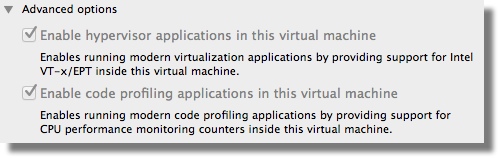
- Install Ubuntu 12.04 or whatever the latest release is. Instructions here. That how-to is for VirtualBox but everything is pretty much the same. The screencast shows the two important pieces which are 2 Nics, with eth0 (Nic 1) being bridged and eth1 (Nic 2) being "private to my Mac or PC". The second "enable hypervisor applications" under Processors.
- Once you have the base OS install and verify connectivity to the net and repositories with something like 'apt-get update'. Head to this post OpenStack Folsom Quantum Devstack Installation Tutorial.
- Verify HW virt support with the following:
grep --color vmx /proc/cpuinfoThe output should highlight VMX in red on an Intel machine.
DevStack OpenStack localrc configuration with VMWare Fusion
The localrc file contains your OpenStack settings for the installation.ENABLED_SERVICES=q-meta,q-lbaas,n-obj,n-cpu,n-sch,n-cauth,horizon,mysql,rabbit,sysstat,cinder,c-api,c-vol,c-sch,n-cond,quantum,q-svc,q-agt,q-dhcp,q-l3,n-novnc,n-xvnc,q-lbaas,g-api,g-reg,key,n-api,n-crt ADMIN_PASSWORD=openstack MYSQL_PASSWORD=openstack RABBIT_PASSWORD=openstack SERVICE_PASSWORD=openstack SERVICE_TOKEN=openstack MYSQL_PASSWORD=password LOG=TrueThe localrc configuration above is what I used for the screen cast and below is the /etc/network/interfaces file containing the two NIC configurations.
stack@ub64:~/devstack$ cat /etc/network/interfaces # The loopback network interface auto lo iface lo inet loopback # The primary network interface auto eth0 iface eth0 inet static address 192.168.1.110 netmask 255.255.255.0 network 192.168.1.0 broadcast 192.168.1.255 gateway 192.168.1.1 # dns-* options are implemented by the resolvconf package, if installed dns-nameservers 128.163.1.6 auto eth1 iface eth1 inet manual up ifconfig $IFACE 0.0.0.0 up up ip link set $IFACE promisc on down ip link set $IFACE promisc off down ifconfig $IFACE down Then from that dir just run ./stackrc. HOST_IP is your external public eth0 address. Floating range is also on that same address range. Network gateway is the gateway for the VM, while EXT_GW_IP is the physical host gateway. Those things can be a bit confusing in Quantum. I am going to try and find some time this week to post some Quantum clarifications, or at least how I *think* they are :) After installation just point your browser at the HOST_IP. I have quite a few tutorials on creating and importing images and what not for OpenStack for learning Ops.Download Devstack and run ./stack.sh
sudo apt-get install git git clone git://github.com/openstack-dev/devstack.git cd devstackDevStack OpenStack Installation with VMware Fusion
There are more details in the linked post in step #2 above along with some netmaps. The screencast shows the commands in case anyone gets stumped. I made a point of showing that you can provision floating addresses but cannot assign them as of yet. That is a committed fix in progress that can be tracked here. Floating address provisioning can be done from the CLI as demonstrated in the OpenStack Nova CLI Guide. OpenStack Folsom Quantum Devstack Installation Tutorial Has some topologies and clarity on the networking components. Thanks for stopping by!